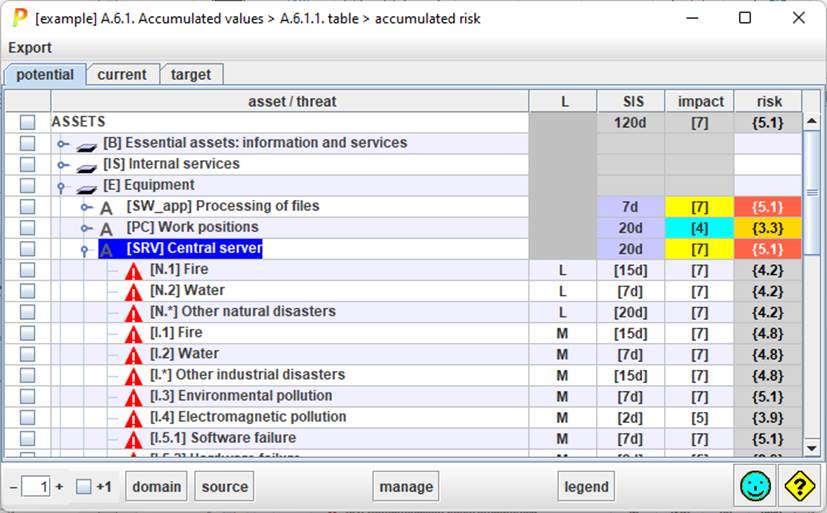
Top menu EXPORT
|
html |
Values from the table are exported to an HTML file |
|
csv |
Values from the table are exported to a CSV file |
|
xml |
Values from the table are exported to an XML file |
|
db |
Values from the table are exported to an external database (if enabled by license) |
Table columns

|
1 |
selection |
Selects some assets to manage. Click on column header to clear the current selection. |
|
2 |
assets |
Assets and threats tree. Double click to expand / compress. |
|
3 |
likelihood |
See “Options / Likelihood”. |
|
4 |
SIS |
SIS - Service Interruption Step Consequence of the threat on the asset. |
|
5 |
impact |
The impact of the threat on the asset. |
|
6 |
risk |
The risk of the threat on the asset. |
Bottom toolbar

|
|
Controls the unfolding of the assets tree. |
|
+1 |
Modifies the unfolding. If selected, PILAR presents the threats. |
|
security domain |
Select a security domain. PILAR will select the assets in that domain. |
|
source |
Select one or more information sources. PILAR will select the assets associated to those sources. |
|
manage |
For the rows selected, PILAR collects the risks, and jumps into safeguards valuation, taking into account ONLY those risks. |
