To set a qualitative valuation
A fast option is to click CTRL + or CTRL – to increase/decrease the valuation of an asset on a given dimension.
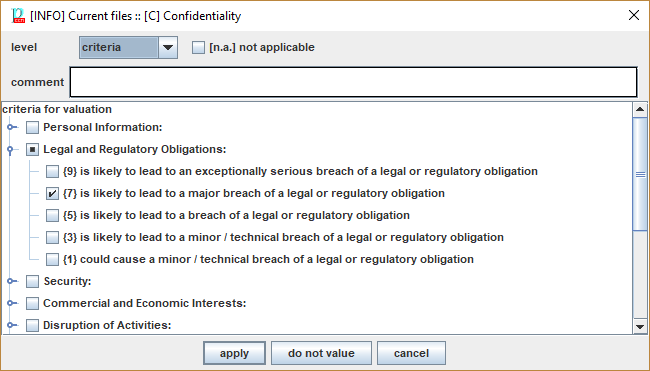
Alternatively, you may open a valuation screen where you may include comments and criteria for valuation.
To assign value to an asset
- select the asset (row) and dimension (column)
- double click
|
If you select “criteria” the value is decided by the highest-ranking criteria marked in panel. If you select any other value, that value is forced, ignoring the criteria (that are retained only for informative purposes). |
|
|
[n.a.] |
If the value has no sense for the asset, and its descendants, mark N.A. See “[[To nullify a valuation]]”. |
|
comment |
A comment explaining the valuation. |
|
panel |
Criteria to rate an asset. |
|
APPLY |
Apply value and close. |
|
DO NOT VALUE |
Remove the value from the asset. |
|
CANCEL |
Close without modifying asset valuation. |