Project data
|
Quick start |
|
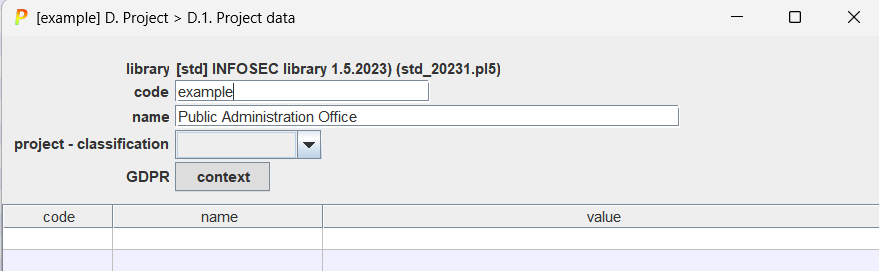
Select a code and a descriptive name. Click OK to continue. |
|
library |
The library (selected on start-up). See configuration in users’ manual |
|
code |
The project code: it should be unique |
|
name |
The name: a short description |
|
classification |
The default marking for the reports |
|
GDPR context |
You may load administrative information to meet the requirements of the GDPR. This information may be system-wide, here, or for specific assets. |
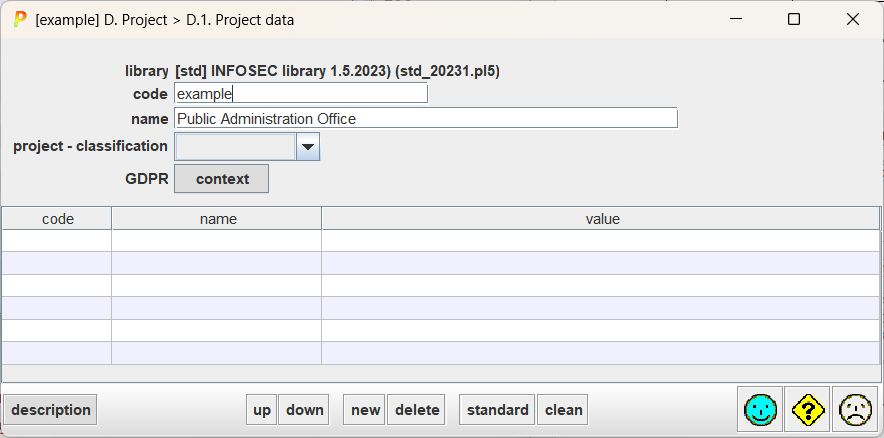
You may add administrative information: key-value pairs.
|
code |
Key codes for key-value pairs. Useful for translations. Click to edit. |
|
name |
Key names for key-value pairs. Click to edit. |
|
value |
Values for key-value pairs. Click to edit. |
|
up |
Select a key-value pair and move it up in the list. |
|
down |
Select a key-value pair and move it down in the list. |
|
new |
Create a new row. |
|
delete |
Remove a row. |
|
standard |
Add standard keys. |
|
clean |
Remove empty rows. |
|
description |
A longer description. The description may include hyperlinks (URLs). |
