Assets menu
|
Creates a new asset. See “[[ra_ai1]]”. |
|
|
new asset / new asset group |
Creates a new asset group (a directory). See “[[ra_ai1]]”. |
|
new asset / duplicate asset |
A new asset is created, using as initial contents that of another asset. You have to edit the new asset and, at least, change the code that must be unique. See “[[ra_ai1]]”. |
|
copy |
Takes one or more assets to be duplicated later on. |
|
cut |
Extracts one or more assets from the tree, to be pasted later on. |
|
paste |
Pastes the assets that were cut into a new place in the tree. |
|
edit |
See “[[ra_ai1]]”. |
|
merge assets |
Select two or more assets and merges them by adding asset classes. You have to edit the new asset and, at least, change the code that must be unique. See “[[ra_ai1]]”. |
|
description |
Jumps directly to the long description for the selected asset. |
|
security domain |
Changes the selected assets into a security domain. |
|
information sources |
Assigns one or more information sources to the selected assets. |
|
sort / [a..z] … |
The selected assets are sorted alphabetically, by code. |
|
sort / … [A..Z] |
The selected assets are sorted alphabetically, by name. |
|
sort / undo |
Undoes the last sorting operation; that is, return to the original order. |
|
asset / group / be group! |
Changes the selected assets from plain assets into asset groups. |
|
asset / group / don’t be group! |
Changes the selected assets from asset groups into plain assets. |
|
delete / delete children |
Removes the children of the selected assets. |
|
delete / delete asset |
Removes the selected assets, and their children. |
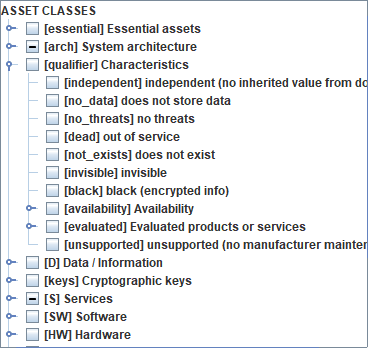
Previous versions included some asset qualifiers. These qualifiers are moved onto asset classes
|
independent |
the asset does not inherit values from the essential information and services in the domain |
|
no_data |
the asset does not store data (some threats are not applicable) |
|
no_threats |
You may mark an asset as threat-free, or subject to threats. |
|
dead |
the asset is out of service. You may stop / restart an asset. It only affects availability. |
|
not_exists |
You may enable / disable an asset. If it does not exist, it is ignored for the risk analysis. |
|
invisible |
You may hide an asset from presentation screens. |
|
black |
data in this asset is encrypted (some threats do not apply) |
|
availability |
tunes the impact on availability |
|
evaluated |
the product or services is evaluated or has a security accreditation |
|
unsupported |
the manufacturer no longer provides security patches |
To insert a new asset
- select one layer | one asset
- menu assets / new asset / new asset
or
- select one layer
- right click / new asset
or
- select one asset
- right click / new asset / new asset
To insert a new group of assets
- select one layer | one asset
- menu assets / new asset / new asset group
or
- select one layer
- right click / new asset group
or
- select one asset
- right click / new asset / new asset group
To insert an asset that duplicates another one
- select one asset
- menu assets / new asset / duplicate asset
or
- select one asset
- right click / new asset / duplicate asset
To edit an asset
- select one asset
- menu assets / edit
or
- select one asset
- right click / edit
To add a long description to an asset
- select one asset
- menu assets / description
or
- select one asset
- right click / description
or while editing the asset
To place an asset into a security domain
- select one asset
- menu assets / domain / select / OK
or
- select one asset
- right click / domain / select / OK
or while editing the asset
To associate one asset to sources of information
- select one asset
- menu assets / information sources / select / OK
or
- select one asset
- right click / information sources / select / OK
or while editing the asset
To transform a plain asset into a group
- select one asset
- menu assets / asset-group / be group
or
- select one asset
- right click / asset-group / be group
To transform a group of assets into a plain asset
- select one asset
- menu assets / asset-group / do not be group
or
- select one asset
- right click / asset-group / do not be group
To remove one asset (and the member of the group if any)
- select one asset
- menu assets / delete / delete asset
or
- select one asset
- right click / delete / delete asset
or
- select one asset
- click DEL
To remove the members of a group
- select one asset
- menu assets / delete / delete children
or
- select one asset
- right click / delete / delete children
To move one asset to another place in the tree
- drag & drop
- cut & paste
or
- SHIFT + UP_ARROW: to move up, before the previous one
- SHIFT + DOWN_ARROW: to move down, after the next one
- SHIFT + LEFT_ARROW: to move left, brother(s) of the current father
- SHIFT + RIGHT_ARROW: to move right, son(s) of the current elder brother