We may have alternative means to replace damaged assets. If so, impact is limited by the tome is takes to fire up the new asset.
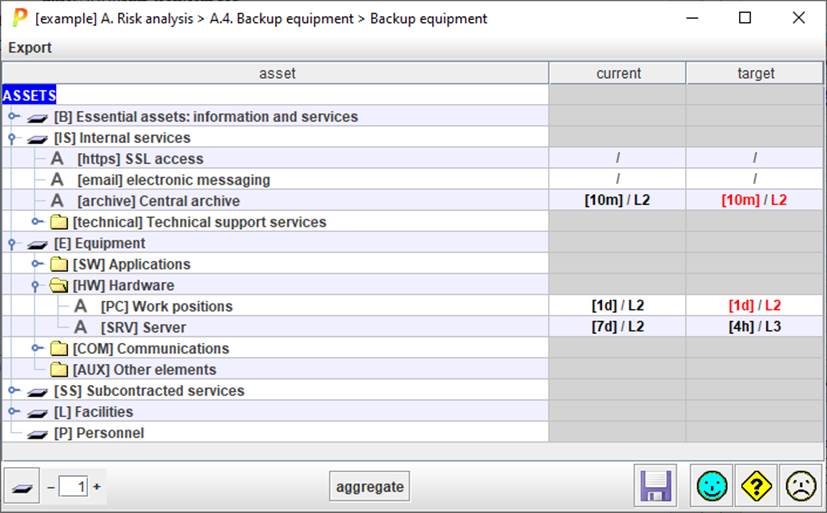
This screen collects the time to start in each project phase.
- Black characters present equipment available in one phase. It applies on next connected phases until changed.
- If no value is provided in a phase, PILAR inherits (RED) from previous.
- No value means no replacement.
Along with the time to replace, a maturity value is introduced to model the maturity of the replacement process.
- If in a phase we state no value, PILAR inherits from previous phase (RED).
Top menu EXPORT
|
CSV |
Export data to a CSV file. |
Table columns
|
1 |
assets |
Assets tree. Click on the handle or double-click on the text to expand / collapse the tree. |
|
2 |
phases |
One column per phase. [interval] / maturity of the process. Double-click to edit Explicit (user) values use black characters. If a cell has no explicit value, PILAR uses the one from the previous phase (if interconnected; see “Options / Project phases”. |
Bottom toolbar

|
|
Click to collapse assets tree. |
|
|
Control the level of expansion of the assets tree. |
|
aggregate |
PILAR translates the consequences onto essential assets. See “Backup / aggregated”. |
|
|
Saves current project either in its file, or in its database. |


