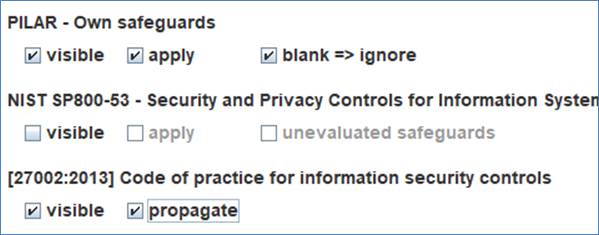
|
safeguards (PILAR and NIST) |
security profiles (EVL) |
|
|
|
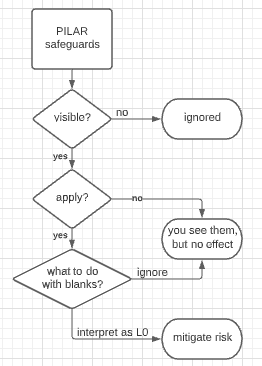
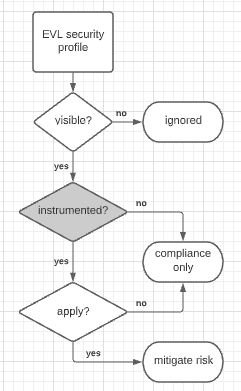
You may control how different security measures (safeguards and profile controls) are used.
For the collection of safeguards in PILAR, you may see them (visible) or not.
· If not visible, they are completely ignored in interface and in risk mitigation.

· If visible, you may choose whether they are applied to mitigate risk, or not.

· If visible and applicable, you may choose how to deal with safeguards that are not evaluated (blank). You may ignore them or use them as if a L0 maturity value were assigned to them.


For NIST 800-53 rev.5 collection of safeguards, you have the same options:

For security profiles, EVL, you may select whether they are visible o invisible.
· If invisible, they are ignored.
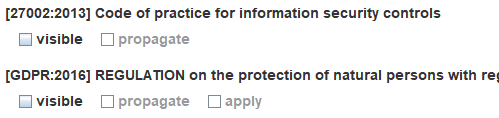
· If visible, you may choose whether maturity values set for controls are automatically propagated (pushed down) to the mapped safeguards.

· For some security profiles, if visible, you may choose to apply their controls to mitigate risk. only some EVL are instrumented with the mitigation knowledge.
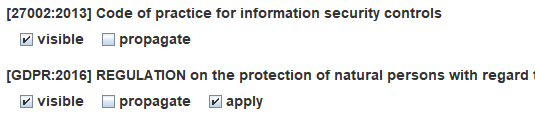
Many EVL profiles link controls to safeguards, and users may valuate both in parallel.
Previous version of PILAR used ONLY PILAR collection of safeguards to treat risk and used EVL profiles for compliance. You may fall back to that working mode selecting options like this
· PILAR: visible + apply
· NIST SP800-53: invisible
· *evl*: visible + propagate